Tuesday, February 21, 2012

New features of SQL Server 2008

 Here I am going to tell you some new transact-SQL enhancement.
1.      Now you can declare and assigne the variables in  a single stagtement. In the old version if you want to declare the variable and assigne the variable then you have to write in the following manner
DECLARE @A BIGINT
      ,@B NVARCHAR(10)
     
SET @A = 10
SET @B = 'test'

            Now you can use the following manner
DECLARE @A BIGINT = 10
       ,@B NVARCHAR(10) = 'test'

      If you are using the reference of a variable in the declaration then it will show the error
DECLARE
       @A BIGINT = 10
       ,@B BIGINT = @A + 1
      
SELECT @B

            You have to change the above statements in the following manner
DECLARE
       @A BIGINT = 10
       ,@B BIGINT
      
SET @B = @A + 1

            You can also assingne the multipal statements in the single line
DECLARE
       @A BIGINT = 10
       ,@B BIGINT
      
SELECT @B = @A + 1, @B +=2

SELECT @B 

The output will be 13
Here you have to use the SELECT statement in the SELECT @B = @A + 1, @B +=2
You can not use SET statement here.
2. Insert multipal statement
     If want want to insert multipal records  then what have to use the  following queries
INSERT INTO Employee (EmpId, Name, Salary)
VALUES ('Emp01' , 'A', 20000)

INSERT INTO Employee (EmpId, Name, Salary)
VALUES ('Emp02' , 'B', 30000)

INSERT INTO Employee (EmpId, Name, Salary)
VALUES ('Emp03' , 'C', 40000)


OR
INSERT INTO Employee (EmpId, Name, Salary)
SELECT 'Emp01' , 'A', 20000
UNION ALL
SELECT 'Emp02' , 'B', 30000
UNION ALL
SELECT 'Emp03' , 'C', 40000

But now we can insert multipal records in a single query
INSERT INTO Employee (EmpId, Name, Salary)
VALUES
('Emp01' , 'A', 20000),
('Emp02' , 'B', 30000),
('Emp03' , 'C', 40000)

If you want apply some conditions or joins on some default values of collection then you have to insert those values into a temp table and apply those joins or conditions. We can achieve this through the new features of SQL Server 2008. Here I am using the  CTE (Common Table Expression ) to insert  default values instead of the temp table and applying the conditions on that
WITH ConditionalDataCTE(EmpId, Name, Salary)
AS
(
       SELECT * FROM
       (VALUES
              ('Emp01' , 'A', 20000),
              ('Emp02' , 'B', 30000),
              ('Emp03' , 'C', 40000)
    ) AS EMP (EmpId, Name, Salary)
)

SELECT * FROM ConditionalDataCTE

Now we can apply different conditions or JOINS on the ConditionalDataCTE. 
SELECT Employee.* FROM ConditionalDataCTE
INNER JOIN Employee ON Employee.EmpId = ConditionalDataCTE.EmpId

3. New Merge statement
     If we have a collection of records and want to update or insert through a single query then we can achieve this through the Merge statement. The syntax of the Merge statement is
MERGE [INTO] <target table>
USING table or table expression>
ON merge predicate> (semantics similar to outer join)
WHEN MATCHED <statement to run when match found in target>
WHEN [TARGET] NOT MATCHED <statement to run when no match found in target>


Here I am using an Employee  table and I have to update and insert the multipal records in the Employee table then I will use the following query
WITH NewEmployee(EmpId, Name, Salary)
AS
(
       SELECT * FROM
       (VALUES
              ('Emp01' , 'A', 20000),
              ('Emp02' , 'B', 70000),
              ('Emp03' , 'C', 80000),
              ('Emp04' , 'D', 80000)
    ) AS EMP (EmpId, Name, Salary)
)

MERGE INTO EMPLOYEE
USING NewEmployee
ON EMPLOYEE.EmpId = NewEmployee.EmpId

WHEN  NOT MATCHED THEN
 INSERT (EmpId, Name, Salary)
 VALUES (NewEmployee.EmpId, NewEmployee.Name, NewEmployee.Salary)

WHEN MATCHED THEN
 UPDATE SET
 Name = NewEmployee.Name
 ,Salary = NewEmployee.Salary;


Here I have NewEmployee table and appling the Merge statement with Employee table. If the NewEmployee's EmpId are exist in the Employee table then those records will be updated otherwise those will be inserted.
4. Use Table type paramenter in stored procedure.
   Now we can also pass the table type parameter in the SQL Server Stored Procedure. I am using the following commend to create the table type variable
CREATE TYPE EmployeeTable AS TABLE
(
       [EmpId] [nvarchar](20) NULL,
       [Name] [nvarchar](50) NULL,
       [Salary] [decimal](18, 0) NULL
)
GO

Now need passing this table type variable in the parameter of the stored procedure

CREATE PROCEDURE useTableType
       @NewEmployee AS EmployeeTable READONLY
AS
BEGIN
       SET NOCOUNT ON;

   
MERGE INTO EMPLOYEE
USING @NewEmployee
ON EMPLOYEE.EmpId = [@NewEmployee].[EmpId]

WHEN  NOT MATCHED THEN
 INSERT (EmpId, Name, Salary)
 VALUES ([@NewEmployee].[EmpId], [@NewEmployee].[Name], [@NewEmployee].[Salary])

WHEN MATCHED THEN
 UPDATE SET
 Name = [@NewEmployee].[Name]
 ,Salary = [@NewEmployee].[Salary];

END
GO


Saturday, February 18, 2012

Giving anonymous access to a page and folder using form authentication


One of my friend has the problem using for accessing the page and folder using the form authentication. I thought I should put this solution in the blog. Whenever we use the Form Authentication for the authentication we use the following configuration in the web.cofig file


 <authorization>
      <deny users="?"></deny>
    </authorization>
    <authentication mode="Forms">
      <forms name="MyAuthAsp" defaultUrl="default.aspx" loginUrl="login.aspx" cookieless="AutoDetect" path="/" protection="All" timeout="20"/>
  </authentication>
 

here  <authorization>  section restrictes all the anonomous user to access the other pages of the site. Now the problem is that I need to access some pages i.e. faq.aspx, contact.aspx, career.aspx which are in the root of the site or css and javascript files then I can not go directectly to those pages. To overcome this problem you just need to add the following section in the web.config file


<location path="Default.aspx">
    <system.web>
      <authorization>
        <allow users="*"/>
      </authorization>
    </system.web>
  </location>
 

Now the Default.aspx page will be accessable by the anonomous users withoug login. If you want to access more pages then add that section with the differenct path.


<location path="style.css">
    <system.web>
      <authorization>
        <allow users="*"/>
      </authorization>
    </system.web>
  </location>
 

If you have to access a folder or all the pages of a particula folder then you can specify the folder path here.


<location path="MyFolder">
    <system.web>
      <authorization>
        <allow users="*"/>
      </authorization>
    </system.web>
  </location>

Part 1 : How to use log4net in .net

Introduction


This article describes how to use the log4net for the .net application. Log4net is the open source library used to log the application event message in the different sources. You can log the info into the file, console output, event log or can be send in the email. The main advantage to use this, it's flexibility and extendenbility. You can control the log though the configuration file without change the code. Here I am going to give you the overview how to use the log4net for the asp.net web application.


You just have to create an asp.net website, changed in the web.config file and call the log method.


Steps:


1.      Download the latest dll file of log4net from the link here 

2.      Create the asp.net website, and add the reference of log4net.dll to this application.

3.       Add the following section in the  <configSections>   section of the web.config file


  <configSections>
     <section name="log4net" type="log4net.Config.Log4NetConfigurationSectionHandler,log4net"/>                  
 < configSections>


      4.  Then add the following section in the the  <configSections>  section


  <log4net>

      <appender name="LogFileAppender" type="log4net.Appender.FileAppender">

      <param name="File" value="D:\LogFile.txt"/>

      <param name="AppendToFile" value="true"/>

      <layout type="log4net.Layout.PatternLayout">

        <param name="ConversionPattern" value="%d [%t] %-5p %c %m%n"/>

       </layout>
       </appender>
    <root>

      <level value="DEBUG"/>

      <appender-ref ref="LogFileAppender"/>

    </root>
 </log4net>


Here <log4net>  contains to more sub sections <appender> and <root> Appender specify what type of log to be logged, where it should be logged, how you need to log and what type of information you want to log. Here I have used file appender. The Name of the appender can be anything. The type for the file logger should be log4net.Appender.FileAppender. You can also extend the class as per your need. The "D:\LogFile.tx" specify the file path where it should be logged. specify the log information format. You can also customized this format. The section is used to specify the appender reference and define what level of log you want to logged.


   5.Add the namespace in the default.aspx.cs page


  using log4net;

  using log4net.Config;


  6. Add the following code in the Page_Load method


  private static readonly ILog logger = LogManager.GetLogger(typeof(_Default));


OR


 private static readonly ILog logger =       LogManager.GetLogger(System.Reflection.MethodBase.GetCurrentMethod().DeclaringType)


   7. Add the following code in the Page_Load method


 protected void Page_Load(object sender, EventArgs e)

  {

     DOMConfigurator.Configure();

    try

    {

       int a = 0, b = 1;

       logger.Debug("Log Debug");

       logger.Info("Log info");

       logger.Warn("Log Warn");

       logger.Fatal("Log Fatal");

      float c = b/a;
    }

    catch (Exception ex)

    {

      logger.Error("some errro in the application ",ex);

    }

  }


  7. Run the application.


  8. Now open the LogFile.txt. The output will be


  2012-02-18 13:58:01,197 [2348] DEBUG _Default Log Debug

  2012-02-18 13:58:01,203 [2348] INFO _Default Log info

  2012-02-18 13:58:01,203 [2348] WARN _Default Log Warn

  2012-02-18 13:58:01,203 [2348] FATAL _Default Log Fatal

  2012-02-18 13:58:01,219 [2348] ERROR _Default some errro in the application

  System.DivideByZeroException: Attempted to divide by zero.

  at _Default.Page_Load(Object sender, EventArgs e) in d:\Log4NetWeb\Default.aspx.cs:line 31


Disable log4net


 The big benefit of using the log4net is, you can configure it without changing the code. Once you have completed your code and published the application, then you can change the configuration through the configuration section of the .config file. If you want to disable the log4net then you just need to add the <threshold> section in the appender section. 


      <appender name="LogFileAppender" type="log4net.Appender.FileAppender">

        <threshold value="OFF" />

       <param name="File" value="D:\LogFileInfo.txt"/>

       <param name="AppendToFile" value="true"/>

       <layout type="log4net.Layout.PatternLayout">

         <param name="ConversionPattern" value="%d [%t] %-5p %c %m%n"/>

       </layout>

     </appender>     


Specify log level


You can use 7 type of levels in the logging. These levels specify what kind of log you want to add into your application.


1. ALL

2. Debug

3. Information

4. Warning

5. Error

6. Fatal

7. OFF


The sequence is very important here. ALL specify that all kind of logs will be loged. If you specify Debug then all types of log can be logged. If you specify Information then all the log will be logged except Debug and if you specify Fatal then only Fatal log. OFF type of level will not log any kind of log.  These level are specify in the >

    <root>
      <level value="DEBUG"/>

      <appender-ref ref="LogFileAppender"/>

    </root&gt;


Filters


Filter is the another kind of criteria which tell what kind of level you want to log. Filter is specified in the appender. You can use multipal appender in the same logger and each appender can contain different Filters. As per the name, Filter filters the log information or log the information as per the filter criteria. There are different types of Filters:


StringMatchFilter


This Filter check if the matching string is exist in the log or not. If exist then log the information otherwise does not log.


      <filter type="log4net.Filter.StringMatchFilter">
        <stringToMatch value="Pankaj" />
      </filter>

      <filter type="log4net.Filter.DenyAllFilter" />


Here I have used the Filter section and used the StringMatchFilter filter. It will log only those information which has string "Pankaj". You also have to add the section    <filter type="log4net.Filter.DenyAllFilter" /> . Now I have changed the above code.


    protected void Page_Load(object sender, EventArgs e)
    {

        DOMConfigurator.Configure();

        try

        {

            int a = 0, b = 1;

            logger.Debug("Log Debug");

            logger.Info("Log info");

            logger.Warn("Log Warn");

            logger.Fatal("Pankaj Log Fatal");

            float c = b/a;

        }

        catch (Exception ex)

        {

            logger.Error("some errro in the application ",ex);

        }       

    }


If you don’t include the DenyAllFilter  section then it will log all the log (DEBUG, INFO, WARN, FATAL, ERROR). DenyAllFilter section will deny all the log and stringToMatch log only those information who has the string "Pankaj".


LevelMatchFilter


When you need to log only specified level of log then you can use LevelMatchFilter. For example, if you want to log only ERROR level then the syntax will be


    <filter type="log4net.Filter.LevelMatchFilter">

           <levelToMatch value="ERROR"/>
    </filter>
   <filter type="log4net.Filter.DenyAllFilter" />


LevelRangeFilter


This type of logging is basically used when you need to log a specified range of log. For example, if you want to log only those information which are between the WARNING and FATAL, then the systax will be


  <filter type="log4net.Filter.LevelRangeFilter">
        <levelMin value="WARN" />
        <levelMax value="FATAL" />
   </filter>


Now if you run the  Page_Load  function then only WARN, ERROR and FATAL will be logged, not DEBUG and INFO.


Tuesday, August 10, 2010

Factory Pattern


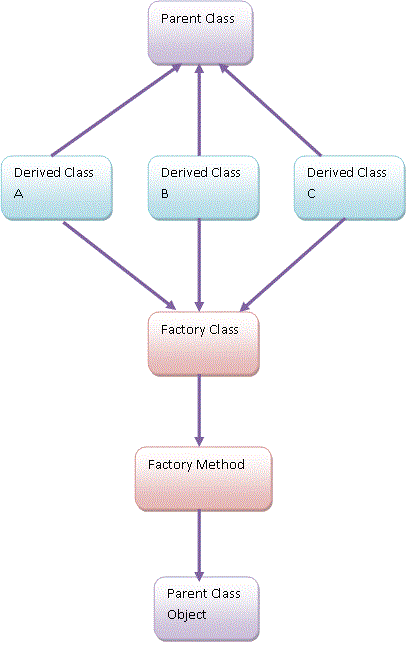
                  In the object oriented programming there are numbers of patterns, one type of pattern is Factory Patterns. When we have several classes and returning an instance of a single class depending on the type of the data is called Factory Pattern. Generally all the classes have a single parent class and each derived class contain same methods. Depending on the data, we fetch a single class object.

 
          In this figure, you can see there is a single Parent class which is derived by 3 Derived Class.  Here we have created a Factory Class, which contains a Factory Method (may contain parameter or not), which returns the parent class’s instance.
To see this figure we can say, the Factory class basically used to decide which derived class object should be initiate. It does not depend on the programmer.
Let me give you an example that will make it simple.
public abstract class NumberClas {  public abstract void Show(); }

Here NumberClass is a parent class, which contains a abstract method Show();
   public class EvenNumber : NumberClass
    {
        public EvenNumber()
        {}
       
       public override void Show()
        {
            Console.WriteLine("Even number.");
        }
    }

  public class OddNumber : NumberClass   {
   public OddNumber ()     {}   public override void Show()         {
  Console.WriteLine("Odd number.");       }
  }

The EvenNumber and OddNumber  are two derived classes, both have the same parent NumberClass and overriding the Show() method. To know the runtime which derived class’s object should be initialize I have created the FactoryClass. This class contains the GetObject(int number) method, which returns the correct object at the run time.

public class FactoryClass
 { 
     public NumberClass GetObject(int number)
     {
       
       if(number % 2 == 0)
         return new  EvenNumber();

else
         return new  OddNumber();
     } }

Now
 static void Main(string[] args)
  {
    //initialice the factory class object
   FactoryClass obFctoryClass = new FactoryClass();
  
   //initilize the base class object through the factory method
    NumberClass obNumberClass = obFactoryClass.GetObject(2);

    //call the derived class method
obNumberClass.Show();
  Console.WriteLine("\n******************");
   //initilize the base class object through the factory method obNumberClass = obFactoryClass.GetObject(3);
  //call the derived class method
obNumberClass.Show(); Console.ReadLine(); } }
Output is

Even number.
******************
Odd number.

Thursday, August 5, 2010

Delegate

What is a Delegate

A delegate is a class that can hold a reference of a method. The type of a delegate is the type or signature of the method rather than the class. A delegate is thus equivalent to a type safe function pointer or a callback. A delegate declaration is sufficient to define a delegate class.

There are three steps in defining and using delegates:
1. Declaration
2. Instantiation
3. Invocation

1. Declaration
The syntax to declare of the delete is

delegate   return-type  identifier([parameters])

example :

public delegate void DelegateSample();

here return-type is void, identifier is the delegate name (DelegateSample) and this delegate does not have any parameter.

2. Instantiation
Every delegate can contain only those functions pointer, which has the same signature. Here DelegateSample can only contain refereces of those function which has return-type void and does not have any parameters.

DelegateSample obDelegateSample = new DelegateSample(ShowMessage);

private void ShowMessage()
{
Response.Write("Function called");
}

Here ShowMessage() is a private function which has return type void and this function does not contain any parameter. Now I have created an object of DelegateSample obDelegateSample and this object contain the refrence of ShowMessage(). Here function and delegate signature is same.


3. Invocation
To invoke the delegate you just need to call the obDelegateSample.

obDelegateSample();
Here I am using a web application.

Example1: Void return-type with no parameter delegate example

public delegate void DelegateSample();

protected void Page_Load(object sender, EventArgs e)
{
DelegateSample obDelegateSample = new      DelegateSample(ShowMessage);

obDelegateSample();
}

private void ShowMessage()
{
Response.Write("Function called");
}

Example2: string return-type with parameter delegate example

public delegate string DelegateSampleReturn(string message);

protected void Page_Load(object sender, EventArgs e)
{

DelegateSampleReturn obDelegateSampleReturn = new   DelegateSampleReturn(ShowMessageReturn);

string returnValue =  obDelegateSampleReturn("hello");

Response.Write(returnValue);
}

private string  ShowMessageReturn(string message)
{
return message;
}

Example3: calling static function

public delegate string DelegateSampleReturn(string message);

protected void Page_Load(object sender, EventArgs e)
{

DelegateSampleReturn obDelegateSampleReturn = new   DelegateSampleReturn(ShowMessageReturn);

string returnValue =  obDelegateSampleReturn("hello");

Response.Write(returnValue);
}

static string  ShowMessageReturn(string message)
{
return message;
}


Example4: Calling different class member functions

public class ClassAdd
{
public static int Add(int a, int b)
{
return a + b;
}

}

public class ClassSub
{
public static int Subtract(int a, int b)
{
return a - b;
}

}
public delegate int DelegateSampleReturnInt(int a, int b);

protected void Page_Load(object sender, EventArgs e)
{
DelegateSampleReturnInt obDelegateSampleReturnInt = new  DelegateSampleReturnInt(ClassAdd.Add);

int returnValue = obDelegateSampleReturnInt(2, 3);
Response.Write("Add :" + returnValue);

obDelegateSampleReturnInt = new DelegateSampleReturnInt(ClassSub.Subtract);

returnValue = obDelegateSampleReturnInt(2, 3);

Response.Write("  Subtract : " + returnValue);

}

Multicast Delegate

A delegate can point to one or more than one function. When delegate point to more than one function, then it is called Multicast Delegate.

In the example4, I have created a single object of DelegateSampleReturnInt obDelegateSampleReturnInt, and obDelegateSampleReturnInt is pointing two different functions. First time it is initializing to the ClassAdd.Add and then invoke the Add() method. Second time it is initializing to the ClassSub.Subtract() method and then invoking that method. The limitation is here, If I do not invoke the Add() method, then It will only invoke Subtract(). To overcome this scenario, we can use Multicast Delegates.

In Multicast Delegate you can call more than one function in a single invocation.
You can use the overloaded += operator to assign an additional funtion to the delegate object. If you want to remove any function reference from the delegate object then you have to use overloaded -= operator.

Multicast delegates must contain only methods that return void; else there is a run-time exception.

//declaration of the delegate
public delegate void DelegateSampleReturn(int a, int b);

protected void Page_Load(object sender, EventArgs e)
{
//initilization 
DelegateSampleReturn obDelegateSampleReturn = new DelegateSampleReturn(Add);

obDelegateSampleReturn += new DelegateSampleReturn(Substract);

//invoke   
obDelegateSampleReturn(2, 3);


}
public void Add(int a, int b)
{
Response.Write("Add :" + a + b);
}
public void Substract(int a, int b)
{
Response.Write("Sub : " + a - b);
}